Cron job और scheduled script monitoring जो खुद को set up कर लेती है
अब boss से यह पता न चले कि कल रात की report चली ही नहीं। Claude या ChatGPT से कहें “मेरी scheduled scripts को monitor करो”। वह jobs set up करता है और हर script में कुछ lines जोड़ता है। जब कोई job fail हो, देर से चले, कभी न चले, या rows की गिनती गलत लगे, तो हम आपको alert भेजते हैं, और आप उससे पूछ सकते हैं कि क्या हुआ।
शुरुआत मुफ़्त · फ़िलहाल हर feature खुला · credit card की ज़रूरत नहीं
Claude या ChatGPT से अपने jobs set up करें और check करें
02:14। रात का import fail हो जाता है। किसी को पता नहीं चलता, जब तक boss न पूछे।
- 02:14 पर रात का sales import database timeout के साथ fail हो जाता है, और किसी को बताया नहीं जाता।
- Claude में आप लिखते हैं "TaskBeacon के साथ शुरुआत करने में मेरी मदद करो।" और script और उसका schedule बताते हैं। वह job बनाता है और script की शुरुआत और अंत के लिए lines देता है।
- या Claude Code में आप लिखते हैं "मेरे scheduled tasks scan करो और बताओ कि किन्हें monitor करना चाहिए।" वह Task Scheduler पढ़ता है, और आपके हाँ कहने के बाद TaskBeacon में तीन jobs set up करता है और तीनों scripts में lines जोड़ता है।
- Job अपने आप TaskBeacon की job list में आ जाता है, और पहले run के बाद OK हो जाता है।
- Script fail होने पर आपको तुरंत error और output की आखिरी lines के साथ email मिलता है, और वापस OK होने पर एक और।
- अगली सुबह आप ChatGPT से पूछते हैं "कल रात क्या fail हुआ?" और वह TaskBeacon से जवाब देता है।
- आप Claude से CRM import को 06:00 पर करने और backup को pause करने को कहते हैं; वह पहले पूछता है, फिर दोनों बदल देता है।
- यही आप app में हाथ से भी कर सकते हैं, या assistant को लिखकर। उसके बाद यह अपने आप चलता है।
Scheduled job monitoring कैसे काम करती है
- 1अपना AI assistant जोड़ें
TaskBeacon को Claude या ChatGPT में जोड़ें और sign in करें। एक मिनट।
- 2उससे अपनी scripts पर नज़र रखने को कहें
वह jobs उनके schedules के साथ बनाता है और हर script में कुछ lines जोड़ता है। खुद करना पसंद है? Code tab आपके लिए lines लिख देता है।
- 3Alert पाएँ, और पूछें
Email, Slack, Teams और दूसरे channels से, जब कोई job fail हो, छूट जाए, देर से चले या अजीब data भेजे। कभी भी पूछें “कल रात क्या fail हुआ?”।
पूछें कि कल रात क्या fail हुआ, और पूछकर jobs बदलें
TaskBeacon जुड़े होने पर Claude या ChatGPT में बातचीत के उदाहरण। कुछ भी बनाने या बदलने से पहले assistant आपसे पूछता है।
इस server पर मेरी सभी scheduled scripts को monitor करो।
मुझे 6 cron jobs मिले। आपके list confirm करने के बाद मैंने उन्हीं schedules के साथ 6 TaskBeacon jobs बनाए और हर script में lines जोड़ दीं। nightly_backup.sh पहले ही रिपोर्ट कर चुका है: OK। Alerts तुरंत आपके email पर जाते हैं।
कल रात क्या fail हुआ, और क्यों?
CRM import 02:14 पर KeyError: 'amount' के साथ fail हुआ। Export का column अब 'total_amount' कहलाता है; crm_import.py की line 41 बदलें। बाकी 5 jobs समय पर चले।
आज sales load में सिर्फ़ 12 rows क्यों थीं?
यह आमतौर पर लगभग 48,000 load करता है। आज का run 06:30 पर शुरू हुआ, लेकिन source फ़ाइल 06:58 पर आई। Job को 07:15 पर कर दें या script में फ़ाइल का इंतज़ार करें।
Weekly forecast को सोमवार 07:30 पर कर दो, और पुराना FTP export pause कर दो।
हो गया: Weekly forecast अब सोमवार को 07:30 पर run की उम्मीद करता है। FTP export paused है, इसलिए जब तक आप उसे resume नहीं करते, वह कोई alert नहीं भेजता।
Claude, ChatGPT और MCP servers से जुड़ने वाले दूसरे apps के साथ काम करता है। पढ़ना हर plan पर है; chat से jobs set up करना Pro और Team पर। कैसे जोड़ें
आपकी Python, R, Stata या PowerShell script में तीन lines
TaskBeacon का बनाया असली code, जिसमें आपके job का अपना address है। आपका assistant इसे लगा देता है, या आप खुद paste करते हैं।
# --- TaskBeacon: top of the script (standard library only) ---
import json, traceback, urllib.request

TB = "https://taskbeacon.io/ping/your-job-id"

def tb_ping(path="", data=None):
    body = json.dumps(data).encode() if data else None
    req = urllib.request.Request(TB + path, data=body, headers={"Content-Type": "application/json"})
    try:
        urllib.request.urlopen(req, timeout=10)
    except Exception as e:
        print("TaskBeacon ping failed:", e)

tb_ping("/start")

try:
    # --- your code here ---
    df = [1, 2, 3]  # example data: replace with your own (e.g. pandas.read_csv)
except Exception as e:
    # the error and the last 20 lines of the traceback go with the failure
    tb_ping("/fail", {"error": f"{type(e).__name__}: {e}"[:200],
                       "log": "\n".join(traceback.format_exc().splitlines()[-20:])[-4000:]})
    raise

# --- TaskBeacon: end of the script ---
tb_ping("", {"rows": len(df)})# Save as C:\jobs\taskbeacon-run.ps1
# Task Scheduler > Action: Start a program
# Program: powershell.exe
# Arguments: -NoProfile -ExecutionPolicy Bypass -File C:\jobs\taskbeacon-run.ps1 "C:\path\to\program.exe" "arg1" "arg2"
# Runs the program, then reports success or failure from its exit code.
# A .ps1 script as the program is run with powershell.exe -NoProfile -ExecutionPolicy Bypass -File script.ps1
# (an execution policy set by Group Policy still wins over Bypass).
$tb = "https://taskbeacon.io/ping/your-job-id"
$program, $programArgs = $args
# a .ps1 file is not a program Windows can start on its own ("not a valid Win32 application")
if ($program -match '\.ps1$') {
$programArgs = @('-NoProfile', '-ExecutionPolicy', 'Bypass', '-File', $program) + @($programArgs | Where-Object { $null -ne $_ })
$program = 'powershell.exe'
}
function Send-TaskBeacon($path, $text) {
$send = @{ UseBasicParsing = $true; TimeoutSec = 10; Uri = ($tb + $path) }
if ($text) { $send.Method = 'Post'; $send.ContentType = 'text/plain; charset=utf-8'; $send.Body = [Text.Encoding]::UTF8.GetBytes($text) }
try { Invoke-WebRequest @send | Out-Null }
catch { Write-Host "TaskBeacon ping failed: $_" }
}
Send-TaskBeacon "/start"
# keep arguments that contain spaces together
$argLine = ($programArgs | ForEach-Object { if ($_ -eq '' -or $_ -match '[\s"]') { '"' + ($_ -replace '"', '\"') + '"' } else { $_ } }) -join ' '
# Windows PowerShell 5.1 refuses an empty -ArgumentList: pass it only when there are arguments
$run = @{ FilePath = $program; Wait = $true; PassThru = $true; NoNewWindow = $true; ErrorAction = 'Stop' }
if ($argLine) { $run.ArgumentList = $argLine }
# the program's output goes to temporary files: shown below, and its last 20 lines go with a failure
$out = [IO.Path]::GetTempFileName(); $err = [IO.Path]::GetTempFileName()
$run.RedirectStandardOutput = $out; $run.RedirectStandardError = $err
$code = 1
$note = ''
try {
$p = Start-Process @run
if ($null -ne $p.ExitCode) { $code = $p.ExitCode }
} catch { $note = "Could not start ${program}: $_"; Write-Host $note }
Get-Content -LiteralPath $out, $err -ErrorAction SilentlyContinue
$tail = ''
if ($code -ne 0) {
$lines = @(Get-Content -LiteralPath $out, $err -Tail 20 -ErrorAction SilentlyContinue) + @($note)
$tail = ($lines | Where-Object { $_ } | ForEach-Object { if ($_.Length -gt 300) { $_.Substring(0, 300) } else { $_ } }) -join "`n"
}
# the exit code goes at the end of the address: /0 = OK, any other number = failed
Send-TaskBeacon "/$code" $tail
Remove-Item -LiteralPath $out, $err -ErrorAction SilentlyContinue
exit $code # not 0 when it failed, so Task Scheduler shows the failure too# --- TaskBeacon: top of the script (base R only) ---
tb <- "https://taskbeacon.io/ping/your-job-id"
tb_log <- "" # optional: this script's log file (e.g. Rscript job.R > job.log 2>&1); its last 20 lines go with a failure
tb_ping <- function(path = "") {
old <- options(timeout = 10) # wait at most 10 seconds (R's default is 60)
on.exit(options(old))
invisible(try(suppressWarnings(readLines(paste0(tb, path), warn = FALSE)), silent = TRUE))
}
tb_num <- function(x) utils::URLencode(format(x, scientific = FALSE, digits = 15, trim = TRUE), reserved = TRUE)
tb_tail <- function() {
if (!nzchar(tb_log) || !file.exists(tb_log)) return("")
text <- paste(utils::tail(readLines(tb_log, warn = FALSE), 20), collapse = "\n")
if (nchar(text) > 700) text <- sub("^[^\n]*\n", "", substr(text, nchar(text) - 700, nchar(text)))
paste0("&log=", utils::URLencode(text, reserved = TRUE))
}
tb_ping("/start")
tryCatch({
# --- your code here ---
df <- data.frame(x = 1:3) # example data: replace with your own
}, error = function(e) {
tb_ping(paste0("/fail?error=", utils::URLencode(substr(conditionMessage(e), 1, 200), reserved = TRUE), tb_tail()))
stop(e)
})
# --- TaskBeacon: end of the script ---
tb_ping(paste0("?", "rows=", tb_num(nrow(df))))* --- TaskBeacon: top of the do-file ---
local tb "https://taskbeacon.io/ping/your-job-id"
* curl.exe is built into Windows 10 and 11; macOS and Linux have curl
local tb_curl = cond(c(os) == "Windows", "curl.exe", "curl")
local tb_log "" // optional: this do-file's log (batch mode: stata -b do job.do, or StataMP-64.exe /e do job.do on Windows, writes job.log in the current folder); its last 20 lines go with a failure
shell `tb_curl' -fsS -m 10 "`tb'/start"
capture noisily {
* --- your code here (the example data: replace with your own) ---
sysuse auto, clear
}
quietly {
local tb_rc = _rc
if `tb_rc' {
* the last 20 lines of the log (if tb_log is set) go with the failure
local tb_data ""
if `"`tb_log'"' != "" {
tempfile tb_tail
tempname tb_in tb_out
capture {
file open `tb_in' using `"`tb_log'"', read text
local tb_n 0
file read `tb_in' tb_line
while r(eof) == 0 {
local tb_n = `tb_n' + 1
local tb_k = mod(`tb_n', 20)
local tb_l`tb_k' = substr(`"`macval(tb_line)'"', 1, 300)
file read `tb_in' tb_line
}
file close `tb_in'
file open `tb_out' using `"`tb_tail'"', write text replace
forvalues tb_i = `=max(1, `tb_n' - 19)'/`tb_n' {
local tb_k = mod(`tb_i', 20)
file write `tb_out' `"`macval(tb_l`tb_k')'"' _n
}
file close `tb_out'
local tb_data `"--data-binary "@`tb_tail'" -H "Content-Type: text/plain""'
}
capture file close `tb_in'
capture file close `tb_out'
}
shell `tb_curl' -fsS -m 10 `tb_data' "`tb'/fail?rc=`tb_rc'"
exit `tb_rc'
}
}
* --- TaskBeacon: end of the do-file ---
local tb_rows = _N
shell `tb_curl' -fsS -m 10 "`tb'?rows=`tb_rows'"@echo off
REM Save as C:\jobs\taskbeacon-run.bat
REM Task Scheduler > Action: Start a program
REM Program: C:\jobs\taskbeacon-run.bat
REM Runs your job, then reports success or failure from its exit code.
set "TB=https://taskbeacon.io/ping/your-job-id"
curl.exe -fsS -m 10 "%TB%/start" >nul
REM --- your job here (a program, a script, another .bat with call): replace the path ---
REM its output goes to a temporary file: shown below, and its last 20 lines go with a failure
set "TB_LOG=%TEMP%\taskbeacon-%RANDOM%.log"
call "C:\path\to\your-job.bat" > "%TB_LOG%" 2>&1
set TB_RC=%ERRORLEVEL%
type "%TB_LOG%"
type nul > "%TB_LOG%.tail"
if not "%TB_RC%"=="0" powershell.exe -NoProfile -Command "Get-Content -LiteralPath $env:TB_LOG -Tail 20 | ForEach-Object { if ($_.Length -gt 300) { $_.Substring(0, 300) } else { $_ } }" > "%TB_LOG%.tail" 2>nul
REM the exit code goes at the end of the address: /0 = OK, any other number = failed
curl.exe -fsS -m 10 --data-binary "@%TB_LOG%.tail" -H "Content-Type: text/plain" "%TB%/%TB_RC%" >nul
del "%TB_LOG%" "%TB_LOG%.tail" 2>nul
exit /b %TB_RC%# crontab -e (this example runs every day at 06:00)
0 6 * * * curl -fsS -m 10 https://taskbeacon.io/ping/your-job-id/start >/dev/null; /path/to/your-job.sh; curl -fsS -m 10 "https://taskbeacon.io/ping/your-job-id/$?" >/dev/nullJob dashboard, alerts और run history
TaskBeacon की असली screens, नकली jobs के साथ।
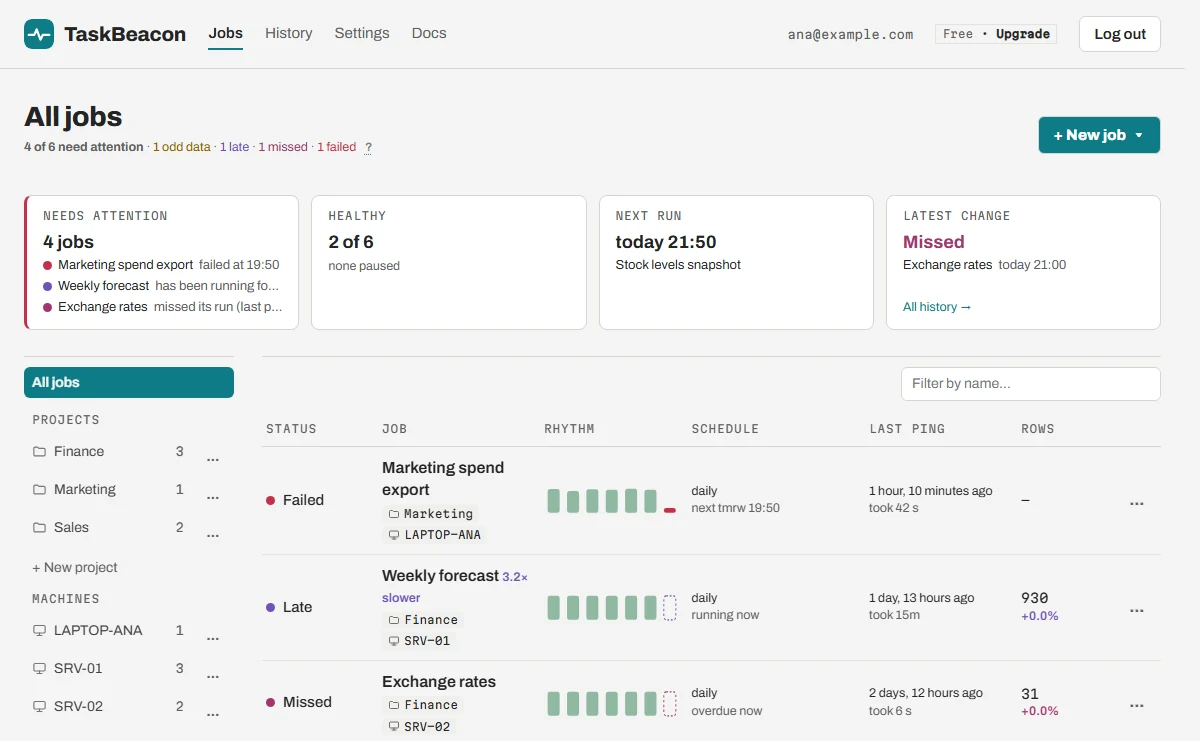
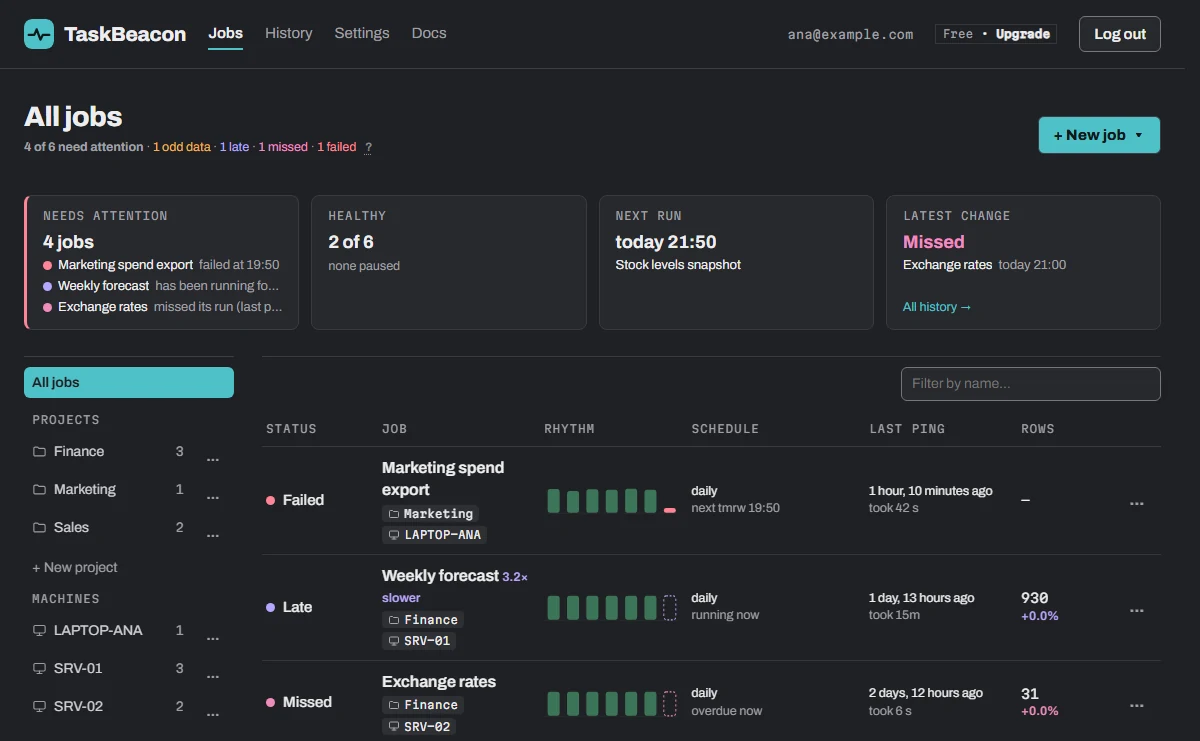
हर job एक ही screen पर
- Problems पहले: failed, late, missed, odd data।
- छोटी bars हर हाल के run को दिखाती हैं।
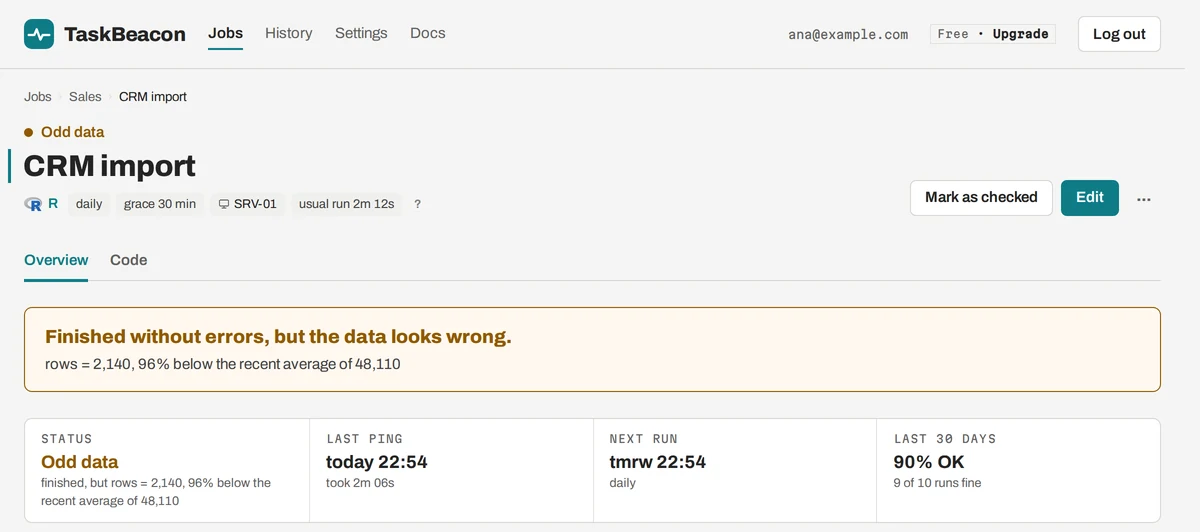
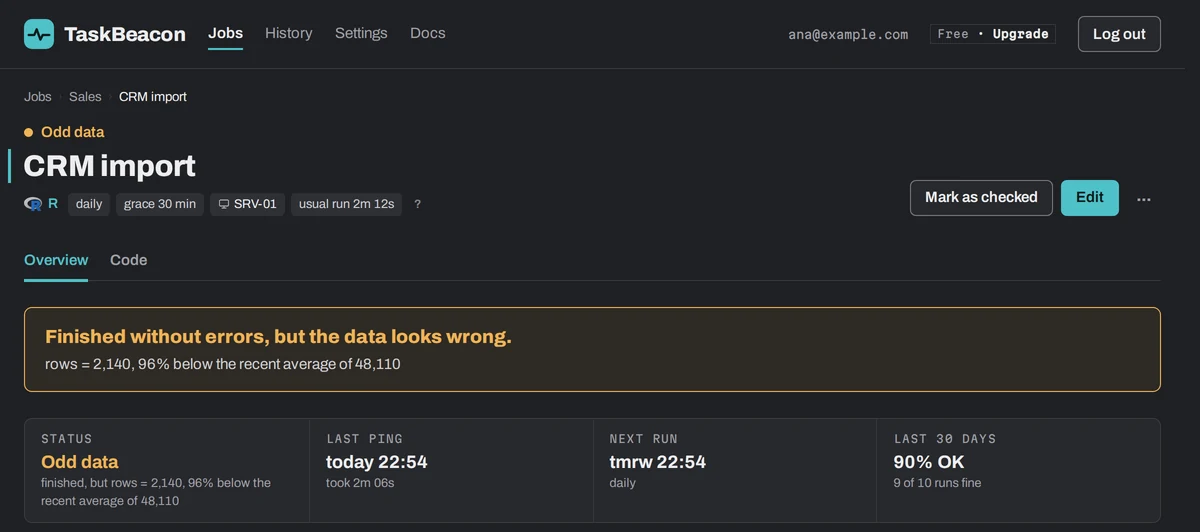
हर job खुद बताता है कि क्या हुआ
- क्या गलत हुआ, एक सीधे वाक्य में।
- हर run की rows, आम स्तर के मुकाबले।
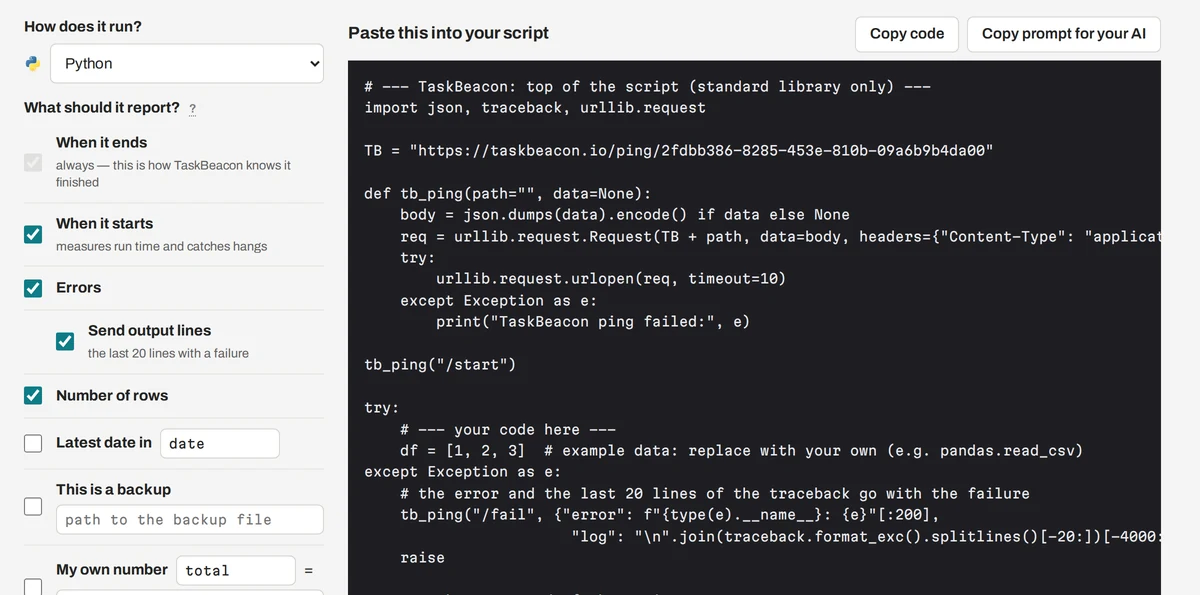
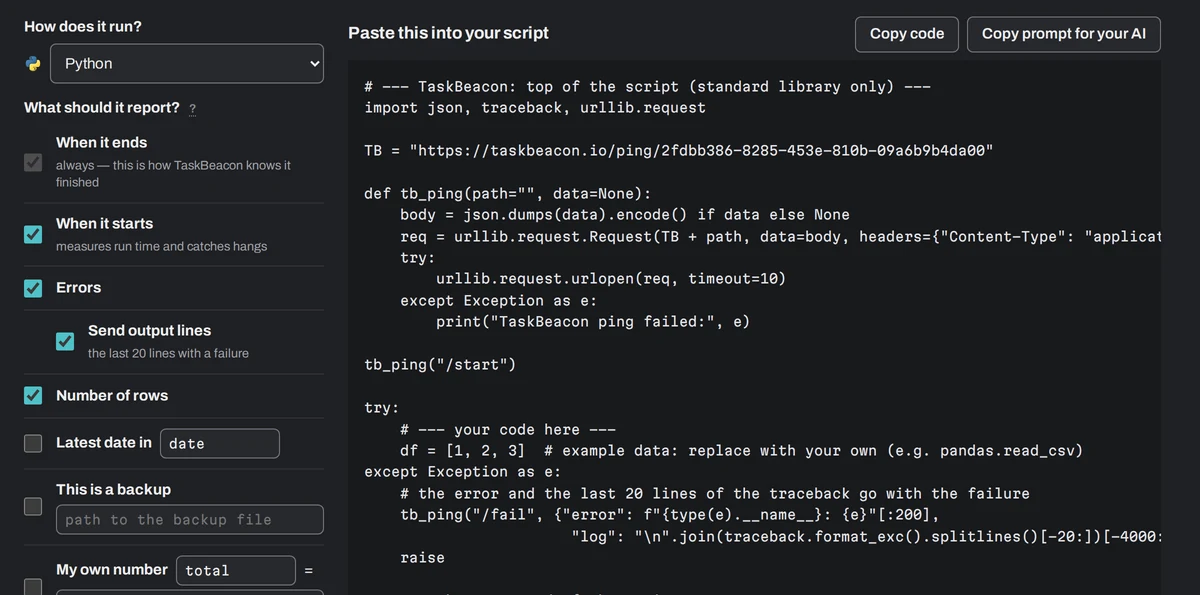
Paste करने वाला code, install करने वाला agent नहीं
- भाषा चुनें और tick करें कि क्या report करना है।
- Start, errors, rows की गिनती, सबसे नई तारीख, backup का size।
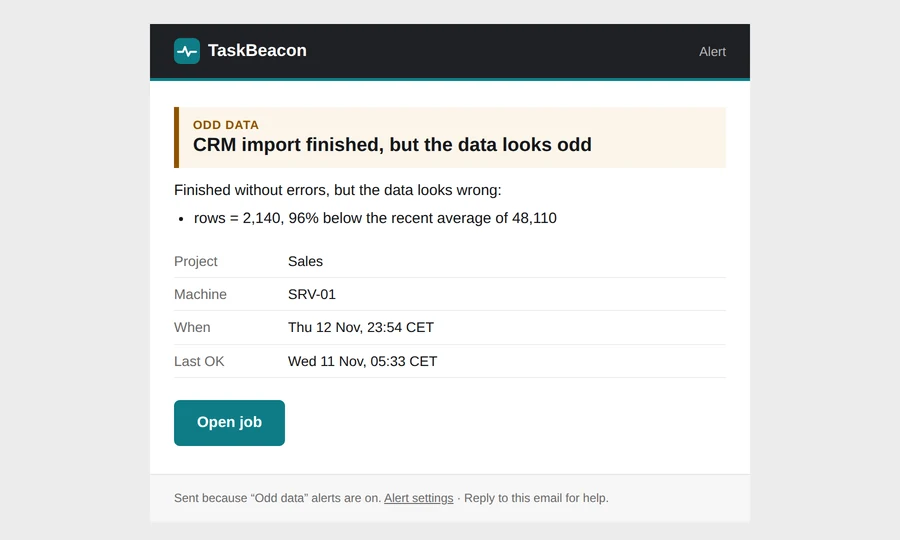
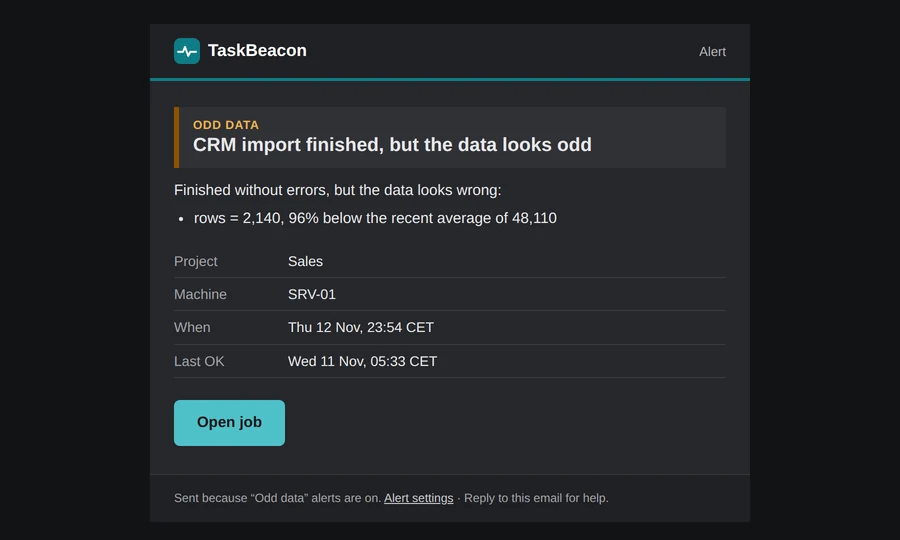
Alerts जो बताते हैं कि क्या करना है
- कारण, machine और आखिरी सही run।
- आपका अपना note: किसे call करना है, क्या दोबारा चलाना है।
“चल गया” का मतलब यह नहीं कि data सही है।
Task Scheduler और cron को सिर्फ़ exit code पता होता है। शून्य rows load करने वाली script भी 0 के साथ exit करती है।
Script ने error बताया, message के साथ।
यह अपने तय समय पर चला ही नहीं।
यह शुरू हुआ और हमेशा से बहुत ज़्यादा समय ले रहा है।
यह चला, लेकिन rows गिर गईं, file खाली है या सबसे नई तारीख पुरानी है।
Cron, Windows Task Scheduler और आपके tools के साथ काम करता है
कुछ भी जो किसी web address को call कर सके। हर card उसके लिए तैयार code और notes खोलता है।
आपकी SCRIPTS और SCHEDULERS
- Python™ भाषा
- PowerShell Task Scheduler
- R भाषा
- Stata Statistics
- SAS Statistics · नया
- SPSS Statistics · नया
- SQL Server Agent Scheduler · नया
- Excel VBA Macro · नया
- Batch (.bat) Windows script
- Node.js भाषा
- Linux cron Scheduler
- No-code tools Power Automate, KNIME, Zapier…
- Websites & APIs Uptime, हमारी ओर से जाँचा गया
- SSL & domains Expiry की चेतावनियाँ
ALERTS कहाँ जाते हैं
INTEGRATIONS · कोई code नहीं, results हम पढ़ते हैं
Product names और logos उनके मालिकों के हैं और सिर्फ़ यह बताने के लिए दिखाए गए हैं कि TaskBeacon उनके साथ काम करता है। R logo © 2016 The R Foundation, CC BY-SA 4.0।
Failed, छूटे हुए, देर से चलने वाले और गलत data वाले jobs जिन्हें यह पकड़ता है
हर एक की व्याख्या: यह क्यों होता है, और इसके लिए alert कैसे पाएँ।
Last Run Result का असली मतलब क्या है।
Error के बाद भी Stata 0 के साथ exit करता है।
न error, न log: बस एक छूटा हुआ run।
Success, जिसने कुछ भी load नहीं किया।
सिर्फ़ owner के inbox तक सीमित नहीं।
हम इसे बाहर से check करते हैं; install करने को कुछ नहीं।
हम दूसरों से कैसे अलग हैं
Pricing
शुरुआत मुफ़्त, और फ़िलहाल हर feature खुला है। Free plan हमेशा रहेगा, और किसी भी चीज़ के पैसे लगने से पहले आपको कम से कम 60 दिन पहले सूचना मिलेगी।
Free
अभी उपलब्धएक analyst और उसकी अपनी scripts के लिए।
card की ज़रूरत नहीं
मुफ़्त शुरू करें- 20 jobs
- Script pings: start, end, exit code
- 3 website checks, हर 5 मिनट
- Row-count rules
- Claude या ChatGPT से पूछें कि क्या fail हुआ (MCP)
- Email और Slack alerts
- रोज़ाना या साप्ताहिक report
- 30 दिन की history
Pro
कई scheduled jobs वाले एक analyst के लिए।
Pro का हर feature फ़िलहाल मुफ़्त है
मुफ़्त शुरू करें, फिर upgrade करें- 100 jobs
- Free में सब कुछ
- हर मिनट website checks, SSL और domain alerts
- Integrations: Power BI, SharePoint, dbt, Fivetran, Azure Data Factory
- Keyword, stale-date और custom-number rules
- Teams, Discord, Google Chat, ntfy, webhook alerts
- हर घंटे reminders और monthly report
- आपके manager के लिए 1 status page
- 12 महीने की history
Team
उस team के लिए जो projects share करती है।
Team का हर feature फ़िलहाल मुफ़्त है
मुफ़्त शुरू करें, फिर upgrade करें- 500 jobs
- Pro में सब कुछ
- Shared projects: कितने भी colleagues, roles के साथ
- हर project के लिए अलग alert routing
- Change log और members के लिए "Send me alerts"
- API
- असीमित status pages, हमारी branding के बिना
- 24 महीने की history
- Priority support, उसी कामकाजी दिन
TaskBeacon का साथ दें — अभी subscribe करें। फ़िलहाल हर feature मुफ़्त है; subscription से आपकी job limit उस plan जितनी हो जाती है और paid plans शुरू होने पर भी वैसी ही रहती है।
पहले मुफ़्त account बनाएँ, फिर Pricing से या Settings → Plan & billing से upgrade करें।
सभी features, और शुरुआती users से हमारा वादा · कीमतों में VAT शामिल नहीं।
पहले job से पहले के सवाल
क्या मेरा data मेरे server से बाहर जाता है?
नहीं। सिर्फ़ ping बाहर जाता है: उसका status (start, finish, fail), समय, आपके जोड़े numbers (जैसे rows की गिनती) और fail होने पर output की आखिरी 20 lines (या error message)। हम भेजने वाला IP address और user agent भी देखते हैं। आपका data, files और database जहाँ हैं वहीं रहते हैं।
मुझे क्या install करना होगा?
कुछ नहीं। Script शुरुआत में एक HTTP call और अंत में एक HTTP call करती है, curl, PowerShell या उस भाषा की अपनी library से।
अगर IT outbound HTTPS block करता है तो?
Machine को HTTPS पर एक address तक पहुँचना होता है। IT से उस एक domain को allow करने को कहें; अंदर कुछ भी आने की ज़रूरत नहीं।